
What Is Happening
If you have recently lost an iPhone or had one stolen, you may get a message saying your phone has been found. The message contains a link to what looks like Apple's Find My map.
The page is not Apple's. It is built to take your information while you are anxious and waiting for news.
The most important thing to know: this page asks for your phone's own passcode — the short code you tap in to unlock the screen. It asks for that before it asks for your Apple Account email or password.
Apple's Find My never asks for your phone's passcode on a web page. Nothing legitimate does.
What the Page Looks Like
We opened the submitted link in an isolated browser and recorded each step.
First, a map loads and slowly zooms in, as though it is closing in on your missing phone. It shows a device called "iPhone 14 Pro," marked Online, at a street address. It copies the layout of the real Find My app, down to the People / Devices / Items / Me buttons along the bottom.
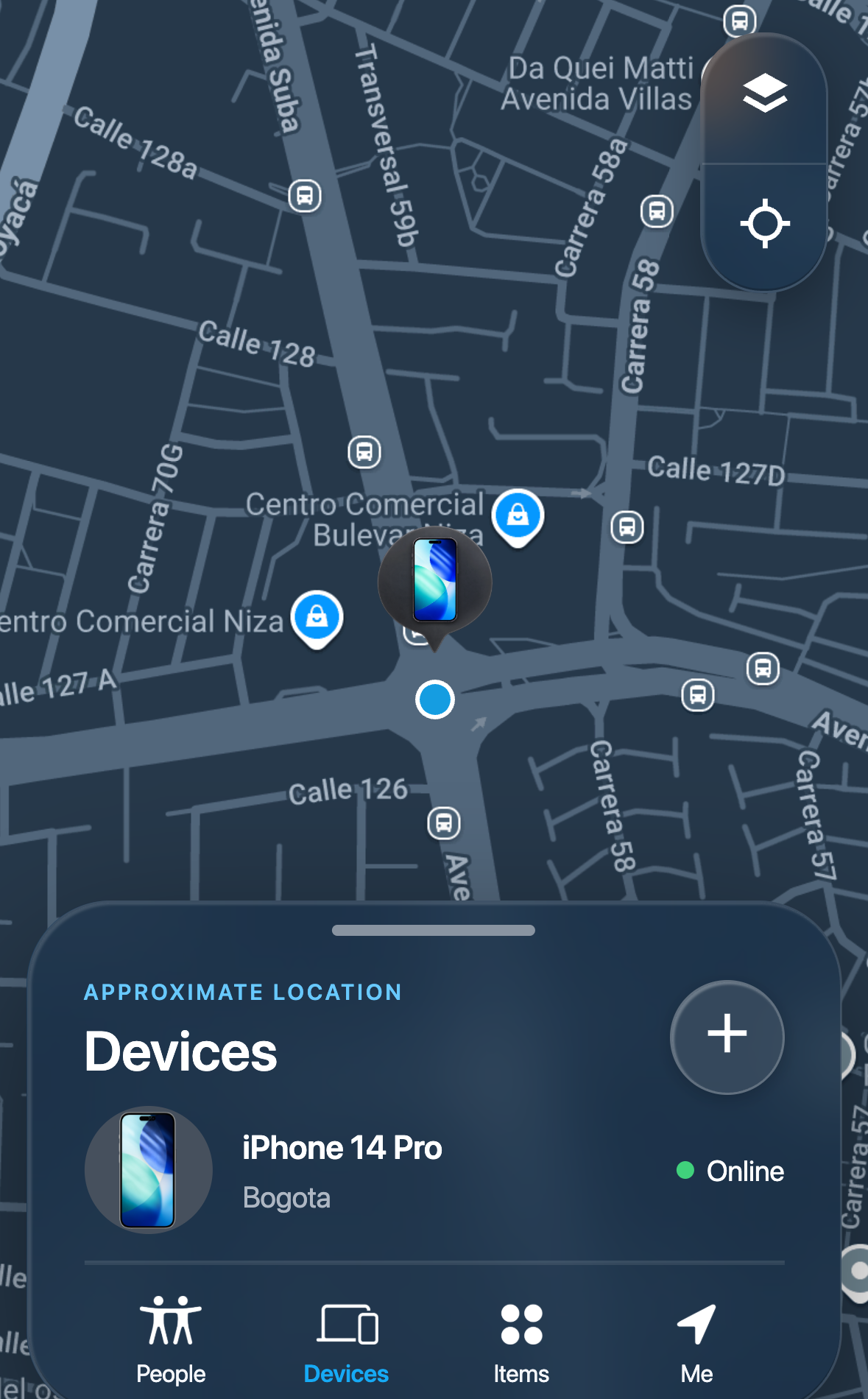
None of this is real. The device name and the location were written into the page in advance. They are the same for everyone who opens it. The page does not know where your phone is.
Then the map dims and a panel slides up:
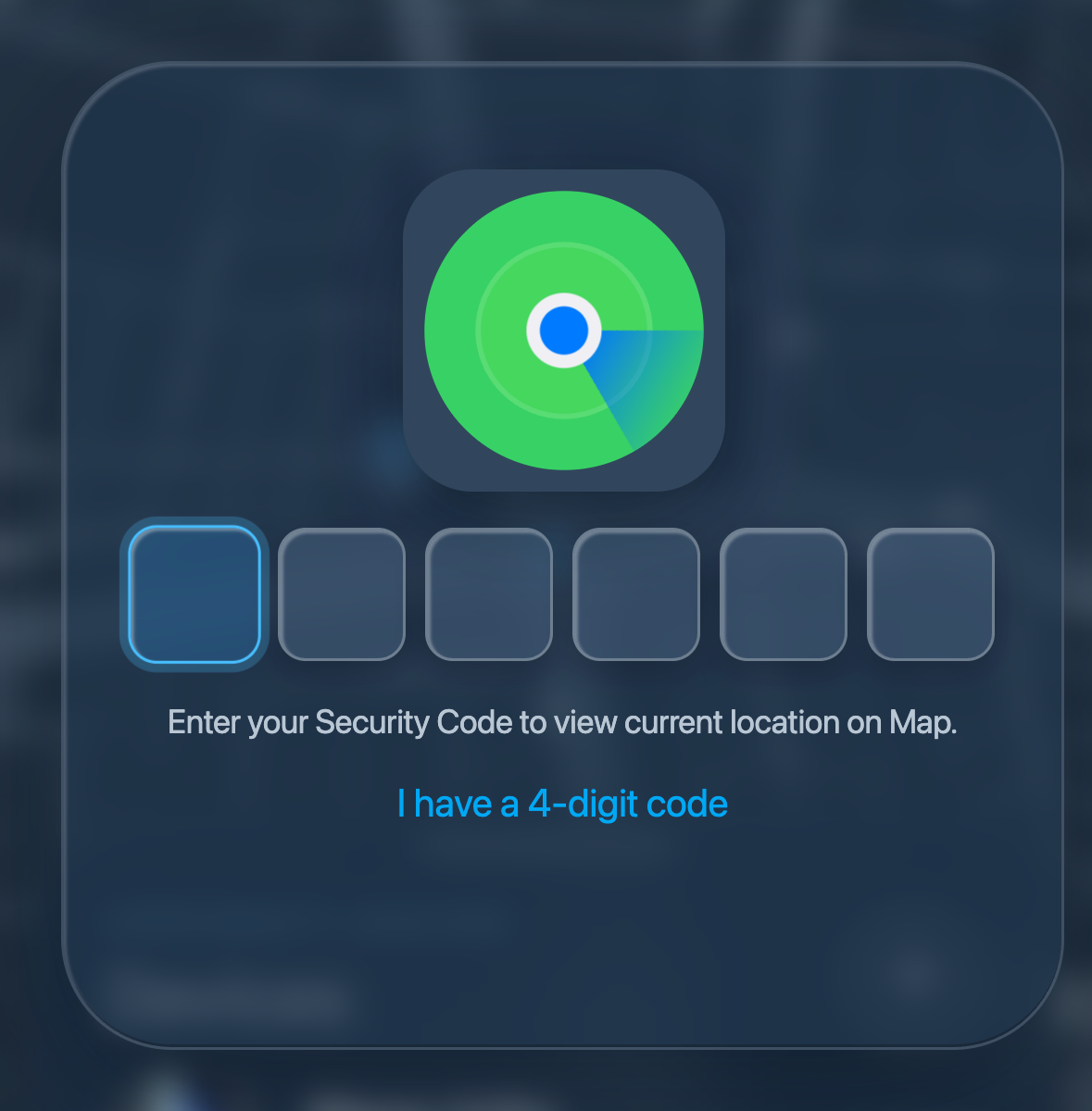
Enter your Security Code to view current location on Map.
"Security Code" sounds like a code Apple sent you. It is not. The panel offers a "I have a 4-digit code" link, which is how iPhone screen passcodes are set — four or six digits. This is asking for the code that unlocks your phone.
It Tells You You're Wrong on Purpose
This is the part worth understanding, because it is designed to feel like your own mistake.
Whatever you type the first time, the page says:
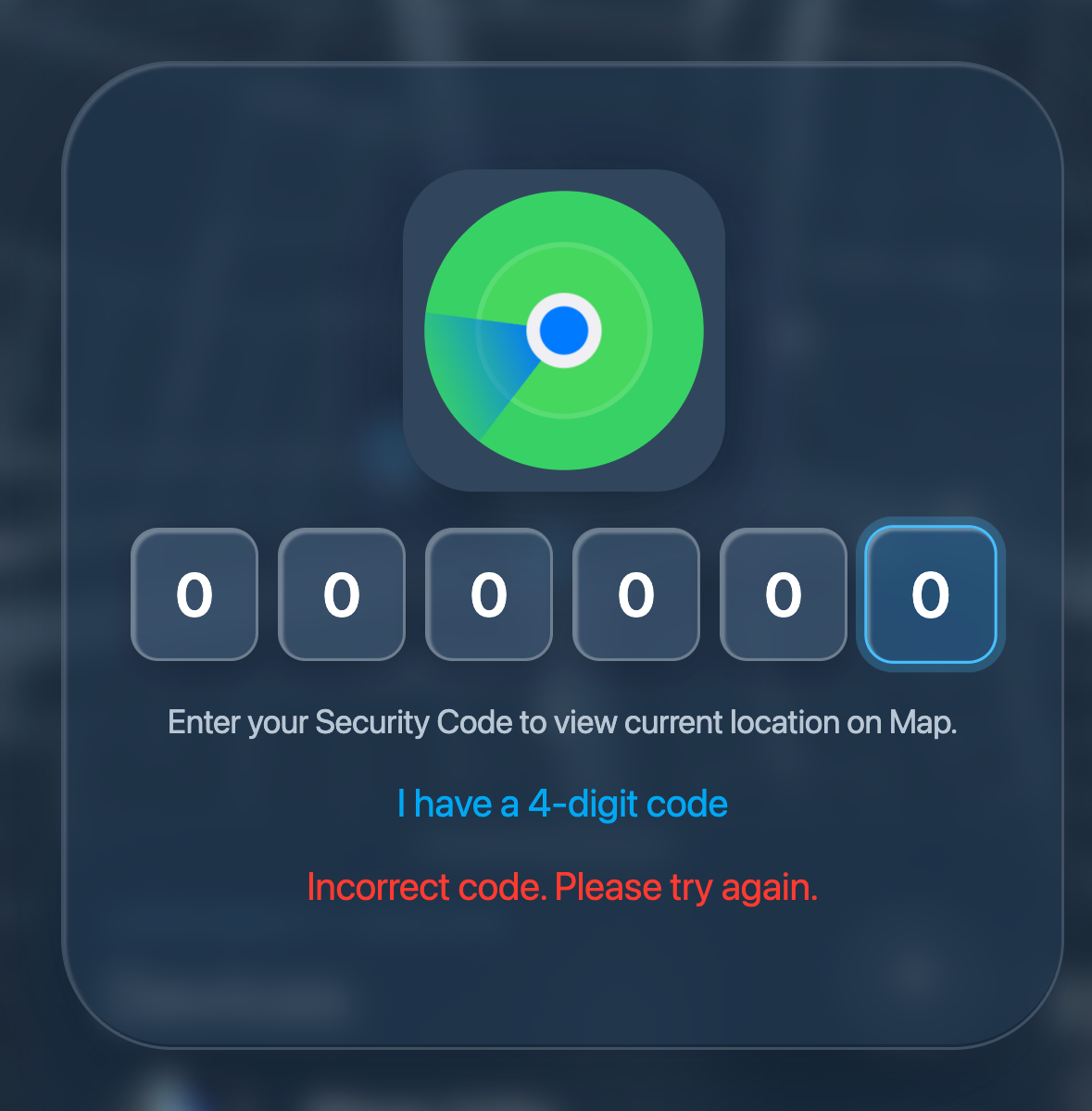
The code was not checked. The page has no way to check it. We confirmed this by watching what the page sent: your first code is sent away before the "incorrect" message appears.
The rejection exists to make you type the code a second time. That gives whoever runs the page two copies to compare, so they can be confident they have it exactly right. In our controlled run, the page tried to send the same code twice, in two separate messages.
Then It Asks for Your Apple Account
After the second code, the panel changes to a sign-in box:
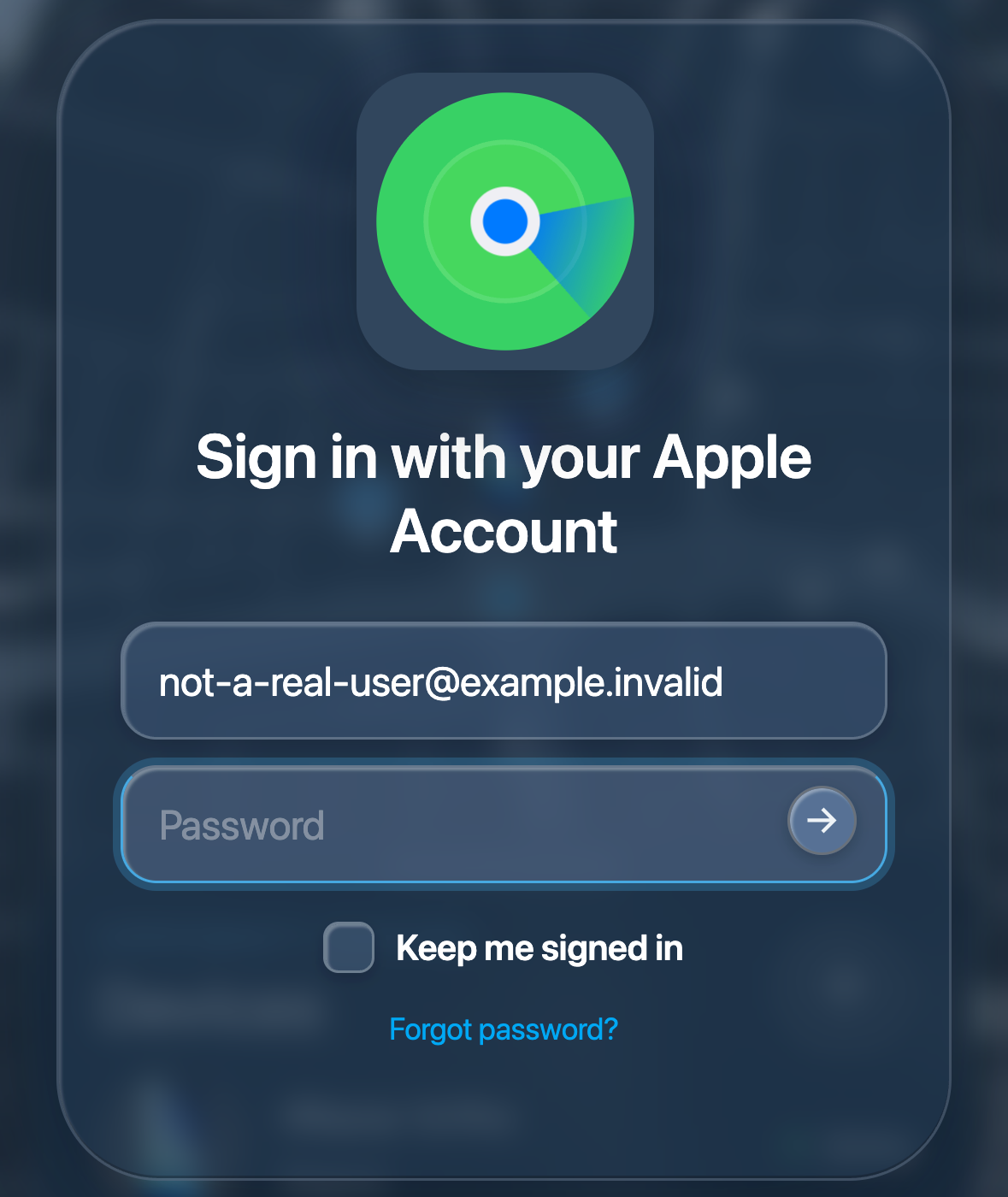
We typed an obviously fake address to see what the page did next. It tried to send the email address away the moment we moved on from that field — before the password was typed at all. The password was then sent separately.
When it is finished, the page sends you to the real icloud.com. Nothing looks broken, so there is no moment where you realise something went wrong.
Why Your Phone's Passcode Matters So Much
Most people think of the passcode as the least important of their secrets. It is six digits, and they type it a hundred times a day in public.
On a modern iPhone it is the opposite. The passcode is the master key. Used on the phone itself, it can change your Apple Account password and switch off Find My. If someone has your phone in their hands and also has your passcode, they can take the device off your account permanently — and take your account with it, including photos, messages, backups and saved passwords.
That is why a page aimed at people whose phone is already missing asks for the passcode first. It is the most valuable thing to ask for, and the thing people are least trained to protect.
About the Web Address
The address used a look-alike name: lcloud.find-ld[.]co.
The first part is not "icloud." It begins with a lowercase L. On a phone screen, in most typefaces, lcloud and icloud look nearly identical. The ending is .co, not .com.
The domain was registered on September 15, 2026 — one day before it was submitted to us.
Look-alike names in this style are not rare. On the day we checked, a public phishing feed listed 245 active domains using the same lowercase-L "lcloud" trick.
What to Do
If you get a message saying your lost phone has been found:
- •Do not use the link, even if the timing fits and you are expecting news.
- •Check for yourself instead. Open the Find My app on another Apple device you own, or type icloud.com/find into a browser yourself.
- •Treat your phone's passcode like a house key. No web page, message, email, or phone call ever needs it.
- •If a page tells you a code is wrong and asks you to type it again, stop. That is a reason to leave, not to try harder.
If you already entered your passcode or Apple Account details:
You still have options, and acting quickly matters.
- •Change your Apple Account password now, from a different device you trust, at account.apple.com.
- •Change your phone's passcode if you still have the phone.
- •Check account.apple.com for devices or trusted phone numbers you do not recognise, and remove them.
- •If you cannot get into your account, use Apple's official account recovery. Do not use any contact details from the message you received.
- •In the United States, you can report it to the FBI's Internet Crime Complaint Center at ic3.gov.
This is not a failure of judgement. The page is built specifically for the moment when you are worried about a missing phone and hoping for good news.
What We Saw, and What It Does Not Prove
What we observed directly: the page's own code, the wording it shows, the order in which it asks for things, the fact that the first code is always rejected after being sent, and the addresses the page tried to send information to. We recorded each step and kept the page's files.
What this does not establish:
- •It does not tell us who built or operates the page. The page's code contains comments written in Spanish and a fixed location in Colombia, but neither shows where any person is or who they are.
- •It does not tell us how many people received the link. The page carried an internal reference number, but a reference number is not a count of recipients or victims.
- •It does not tell us whether any specific person's information was taken.
- •It does not tell us how the link is being delivered. We reviewed the page, not the message that carried it. Based on the page alone, we cannot say whether it arrives by text, email, or another route.
- •A newly registered domain, a look-alike name, or a match in a public feed is a signal. On its own, none of these proves who is responsible.
We did not submit any real account details to the page at any point.
About this investigation
Leonard Melnik carried out this investigation for the Cybersecurity Reach Foundation. Anthropic's Claude assisted with the technical review of the page and with drafting this report. CSRF is a participant in Anthropic's CSP program.
Stay Protected
Use our free tools to protect yourself from the threats discussed in this investigation.