
Article · Alert
Apple outage on November 17, 2026: watch for fake Apple support
Apple sign-in, iCloud and iPhone activation are failing for many people today. The fault is on Apple's side. Anyone who contacts you offering to fix your account or activate your phone is not Apple.
- Published
- Reading time
- 3 minutes
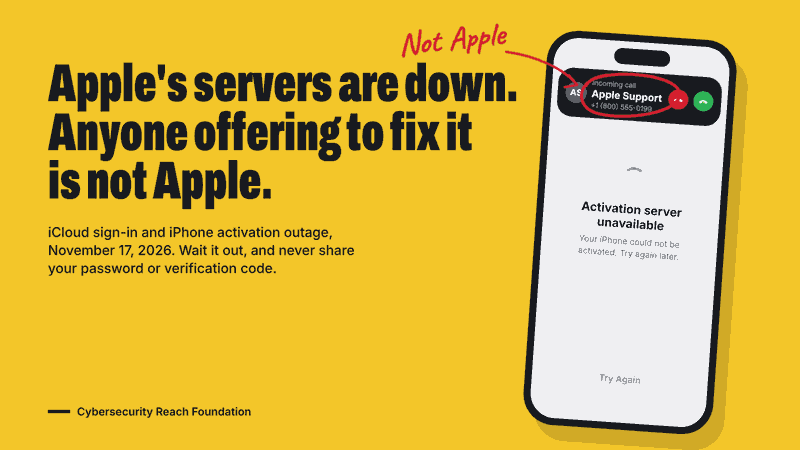
Apple sign-in, iCloud and iPhone activation are failing for many people today. The problem is on Apple's side, and anyone who contacts you offering to fix it is not Apple.
On Tuesday, November 17, people began reporting that they were signed out of iCloud and could not sign back in, that the App Store would not load, and that new iPhones and iPads would not activate. 9to5Mac reported that iCloud, the App Store, Apple Pay, Apple Support and iPhone Activation were affected, while Apple's own System Status page still listed those services as available. Outage trackers kept logging reports through the day, such as "Unable to activate 12 new ipads" and "activation server error when setting up new iOS devices".
This is the second Apple sign-in failure in a week. During the November 10 outage, Apple's servers returned errors like "Authentication Failed", and the fault was on Apple's side: resetting a password did not help.
An outage like this is a good moment for scammers. People who are locked out, or holding a new phone that will not start, go looking for help, and fake support is waiting for them.
At a glance
- What is down: Apple sign-in, iCloud, App Store, Apple Pay and iPhone and iPad activation (reported by users and the press, not yet confirmed by Apple)
- Whose fault: Apple's servers, not your device or your account
- What fixes it: waiting. Nothing you do on your phone, and nothing a "technician" does, will bring Apple's servers back
- What Apple will never ask for: your Apple Account password or your six-digit verification code
How fake Apple support works during an outage
These are the approaches to expect over the next day or two:
- Replies on social media. You post "my iPhone won't activate" and an account calling itself Apple Support, or a helpful stranger, replies with a phone number, a link or a direct message. Real Apple support does not contact you this way.
- Search results and ads. Searching "Apple support number" can surface paid ads and fake pages that lead to a scam call center.
- Texts, emails and calls saying your Apple Account is locked. Because you really were signed out, a message saying "your Apple ID has been suspended, verify now" sounds believable today. The link leads to a fake sign-in page that steals your password and code.
- "Activation" or "unlock" services. Sites and sellers offer to activate a phone or remove Activation Lock for a fee. During an outage they cannot do anything Apple's servers cannot, and paying them puts your money and your account at risk.
The goal is almost always the same: your password and the six-digit code Apple sends you. With both, a scammer can take over your Apple Account, lock you out of your own phone, and reach your photos, messages and Apple Pay. Some will also ask you to install a remote access app or to pay with gift cards.
What to do
- Wait it out. Try again later. If your phone says the activation server is unavailable, leave it on Wi-Fi and retry after the outage ends.
- Check Apple's status yourself at apple.com/support/systemstatus. Today it lagged behind reality, so a green dot does not mean you are doing something wrong.
- Contact Apple only through apple.com or the Apple Support app. Do not use a number or link from a search ad, a social media reply, a text or an email.
- Never share your Apple Account password or verification code with anyone, by phone, chat or text. Apple does not need them to fix an outage.
- Do not install apps or pay anyone to activate, unlock or recover your device.
- If you were signed out, sign back in from Settings on your device once the outage is over. Do not sign in through a link someone sent you.
If you already shared a code or password: from a device you trust, go to Settings, tap your name, and change your password. Check the list of devices signed in to your account and remove any you do not recognize. If you paid anyone, call your bank or card company now. Forward fake Apple emails to reportphishing@apple.com and report the scam to the FTC at reportfraud.ftc.gov.
For schools and businesses setting up devices today: pause the rollout until Apple's services recover, and tell staff that Apple will not call or message them to help.
If you receive a message or call that uses this outage, send it to us at ScamArchive.org so we can warn others.