
Article
One Rule, Thousands of Scams: The Case for Blocking com- Domains
Scammers put "com-" right after a brand name (for example amazon[.]com-apstorelogin[.]us) so a fake link passes a quick glance. Using CSRF phishing feeds, ICANN zone data and a list of nearly 2 million known good domains, this research finds that blocking every web address containing com- catches all com- scam domains in the feeds while blocking about 0.02% of known good domains, and recommends a block-first, allowlist-second policy backed by training.
- Written by
- Pammi Balani · Volunteer researcher
- Published
- Reading time
- 12 minutes

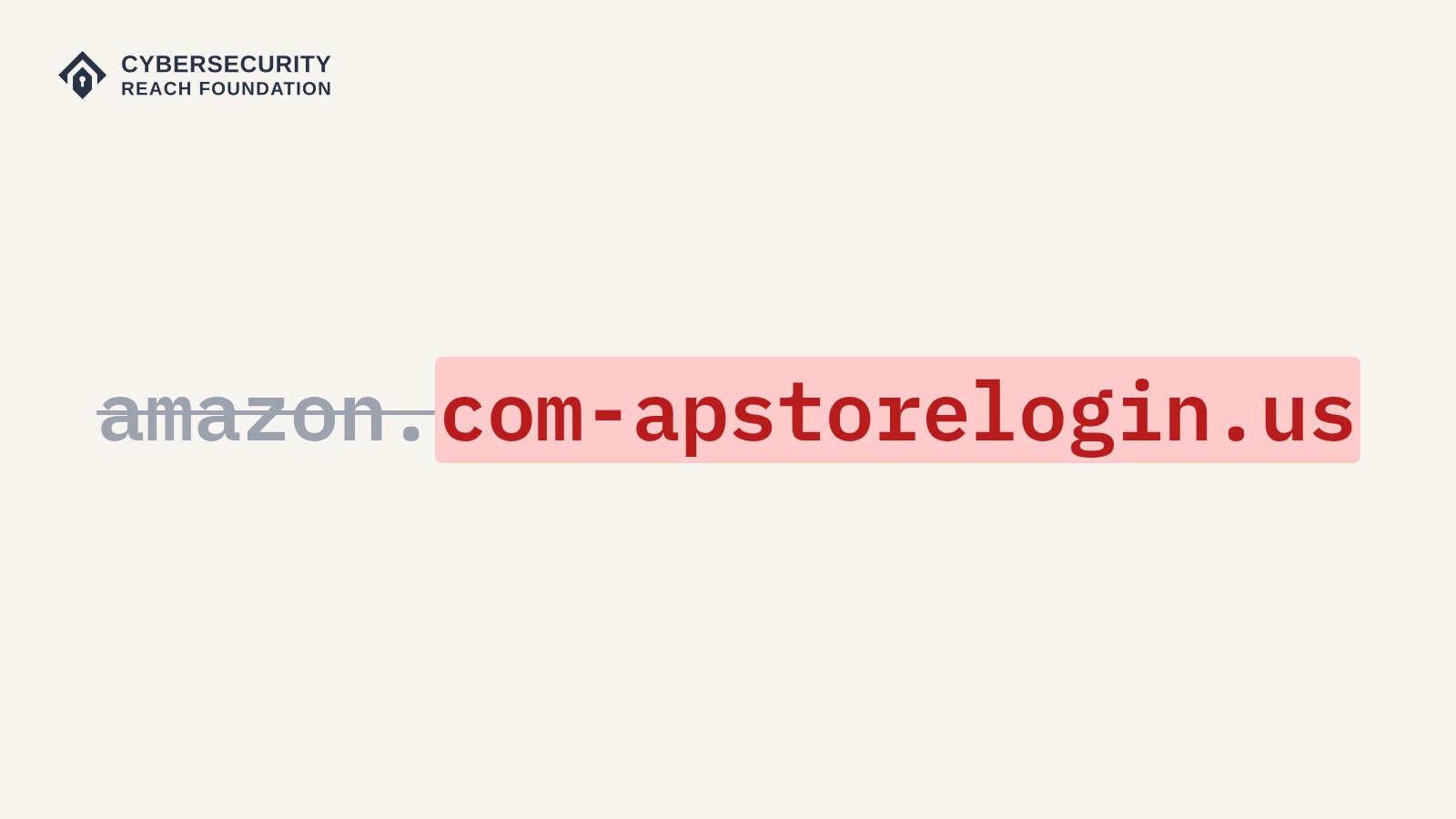
When people get a link, most of them glance at it, see a name they know, and click. Phishing takes advantage of that. Phishing is when someone pretends to be a trusted company through a fake text, email or website to steal passwords, payment details or personal information. One method keeps showing up in real scam links: putting "com-" right after a brand name, so a fake link still passes that quick glance.
A real Amazon link looks like amazon.com/your-orders. A scam link using this trick looks like amazon[.]com-apstorelogin[.]us. At a glance it says "amazon.com," but web addresses are read from right to left, so the link actually lands on the site controlled by com-apstorelogin[.]us. The word "amazon" is just a label placed in front of it. Figure 1 shows real examples from the phishing feeds I analyzed.
Figure 1: Example com- links from the phishing feeds and where each one actually leads. Links are defanged ([.]) so they cannot be clicked.
Example com- links and where they actually lead
| What the link shows | Brand faked | Where it actually leads |
|---|---|---|
| usps[.]com-trackujd[.]top | USPS | com-trackujd[.]top |
| amazon[.]com-apstorelogin[.]us | Amazon | com-apstorelogin[.]us |
| secure[.]runescape[.]com-vzla[.]ru | RuneScape | com-vzla[.]ru |
| facebook[.]com-wd5sulr0f5[.]isiolo[.]go[.]ke | isiolo[.]go[.]ke, a real Kenyan county government website being used to host phishing | |
| fb[.]com-19205919[.]jaynerenault[.]co | jaynerenault[.]co, a website unrelated to Facebook | |
| auth-wetransfer-com-4c95d-5d82f-6f882c[.]vercel[.]app | WeTransfer | A page on vercel[.]app, a free hosting platform |
| www--wellsfargo--com--ub49329d48d6c[.]wsipv6[.]com | Wells Fargo | wsipv6[.]com |
This is harder to track than scam domains that put the brand in the main name, like amazonreturnsreal[.]com. For that kind of name, a scammer has to register a new domain containing "amazon." Brand protection services watch for names like that, and they can be detected on registration and quickly taken down due to trademark infringement or obvious scamming.
With the com- trick, the registered domain is com-apstorelogin[.]us, and "amazon" never appears in it. The brand only shows up in the part in front, called a subdomain, which the scammer can change for free at any time, so one domain can pose as USPS one day and Amazon the next.
Some of these links are even built on other people’s websites, like a real Kenyan county government site in Figure 1 that security vendors on VirusTotal flagged as phishing. Sites like this were most likely compromised and are now being used to host scams that hide behind a real domain while impersonating other brands with the com- trick.
The good news is that the pattern is easy to recognize, and one ending stands out. In the phishing feeds I reviewed, .top accounts for 25% of the reported com- domains, more than any other ending, including .com.
Outside research has seen the same trend. In October 2025, Palo Alto Networks' Unit 42 reported on a text message scam campaign linked to 194,345 fully qualified domain names (FQDNs) across 136,933 root domains, and found that com- was the most commonly registered prefix among those domains until May 2025, with examples like usps[.]com-isjjz[.]top.
For this research, I looked at how common com- domains are in phishing data and in new domain registrations, and whether companies should block every web address containing com- by default. Based on the data, we advise that they should.
Note: Key takeaways
- The "contains com-" rule catches every com- scam domain in the feeds (13,579), while only 416 of nearly 2 million known good domains would be blocked by mistake, about 1 in 4,700.
- .top accounts for 25% of the reported com- domains in the phishing feeds, more than any other ending, including .com.
- About 57 new com- names appeared each day in ICANN zone data between Sept 16 and Oct 16, 2026, and about 1 in 8 were gone within three days.
- Recommendation: block first, then allowlist, backed by phishing training.
Where the Data Comes From
I used three of the data sets we have available in the Cybersecurity Reach Foundation (CSRF):
- Phishing feeds: domains that threat intelligence feeds have flagged as phishing, which show what scammers are actually using.
- ICANN zone data (CZDS): daily copies of the official lists of every registered domain under generic endings like .com, .top and .vip. Comparing one day's list to the next shows which domains were added and removed.
- Known good domains: 1,955,394 legitimate domains, built from three popular website rankings (Tranco, Cisco Umbrella and Majestic) and official company websites listed on Wikidata. This shows how many real sites a block would catch by mistake.
I searched each source for names containing com-. Zone changes cover Sept 16 to Oct 16, 2026, and no scam links were opened at any point.
How Common Is It?
The phishing feeds contain 13,579 different domains with com- in them, and 60% place it right at the start of a section of the address (the parts between the dots), which is the classic version of the trick. A handful of endings make up most of them, led by .top (Figure 2).
Figure 2: Top 10 endings (TLDs) among the 13,579 com- domains in the phishing feeds.
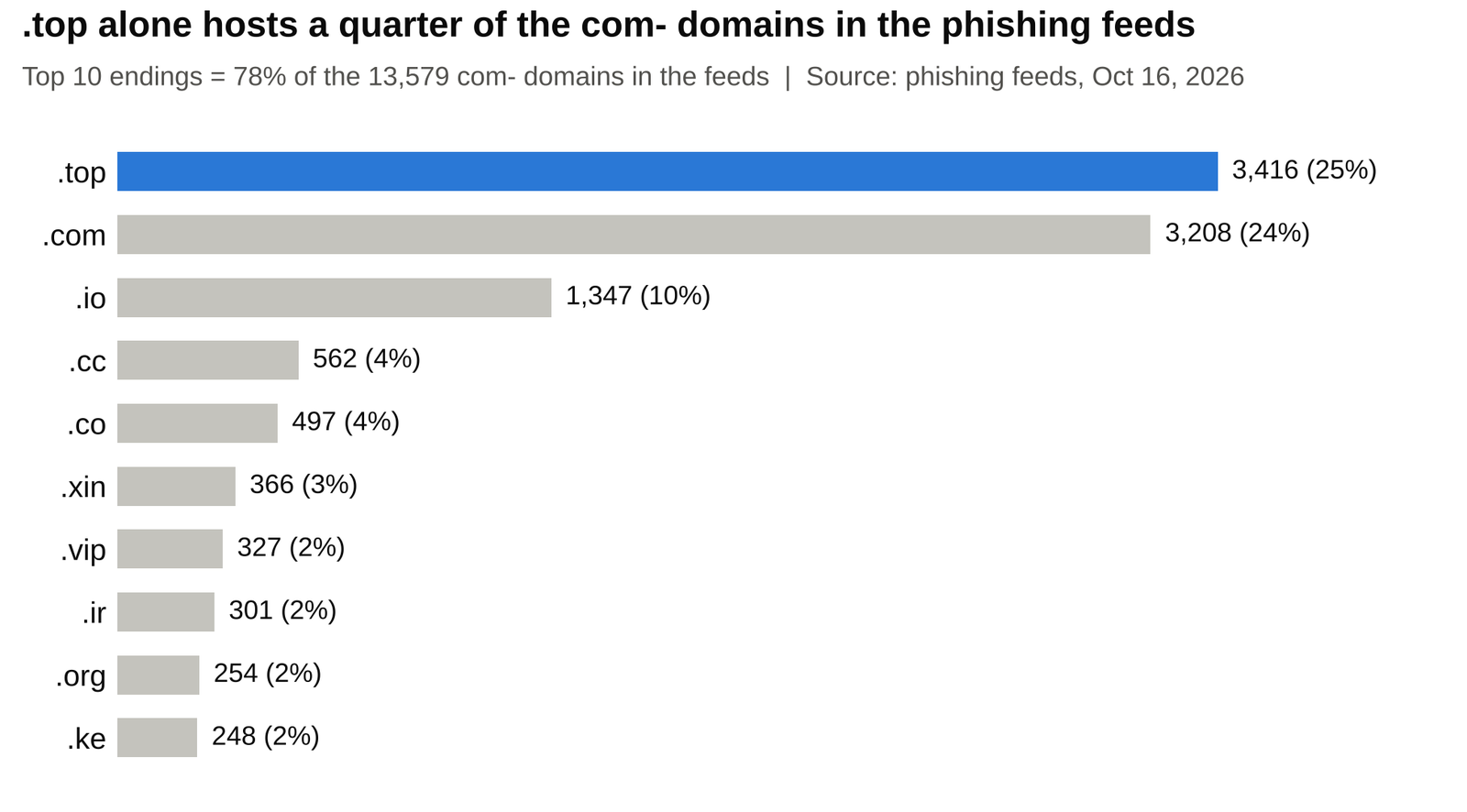
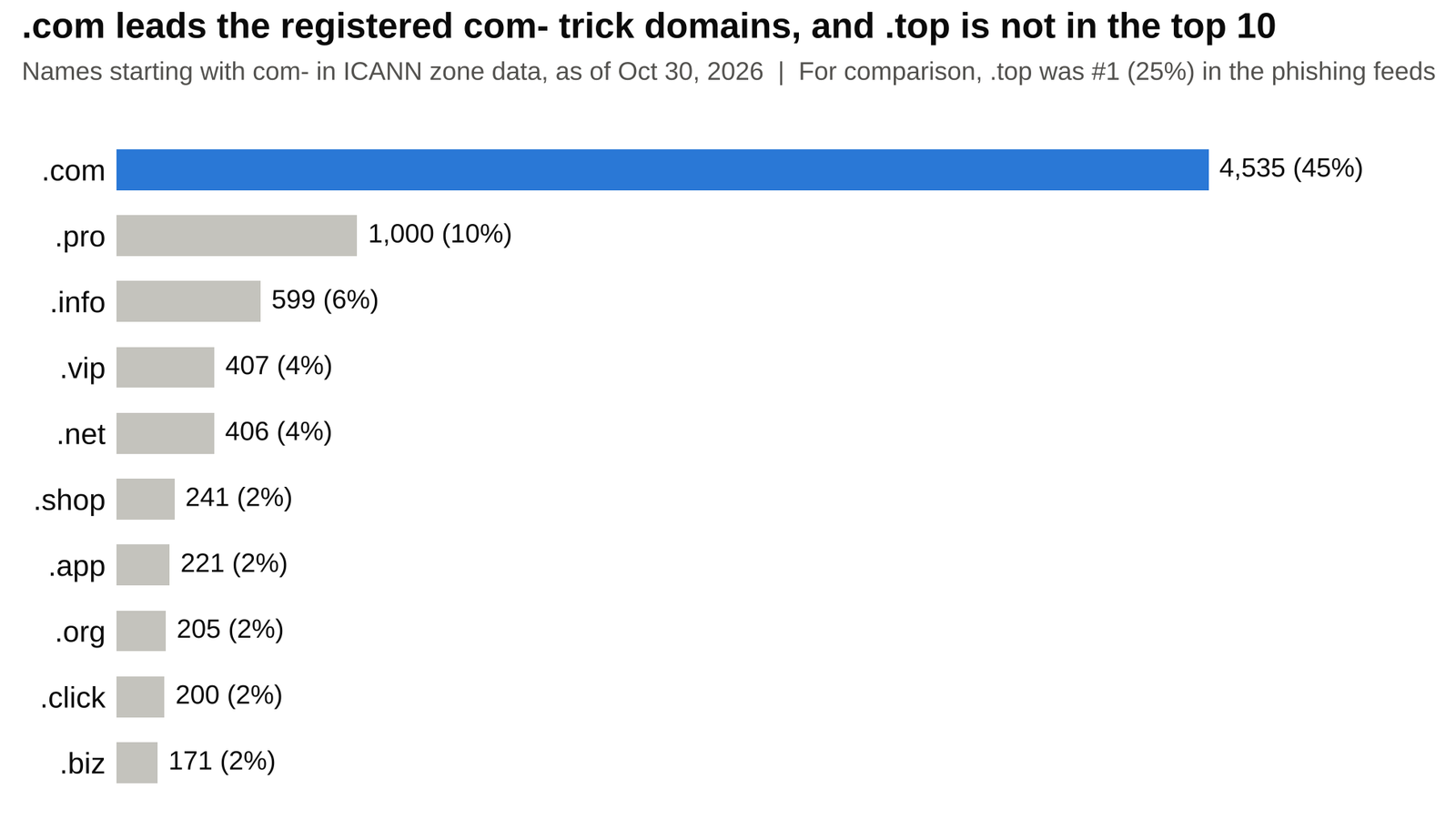
.com ranks second mostly because it is by far the biggest ending overall. It leads the zone data too, holding 45% of the registered com- trick domains (names that start with com-).
The surprise is .top: it is the #1 ending in phishing reports, but it does not even make the top 10 among registered com- trick domains (Figure 3). So .top shows up in phishing reports far more often than its share of registrations would predict, which makes com- names on .top especially worth watching.
Figure 3: Top 10 endings among registered com- trick domains
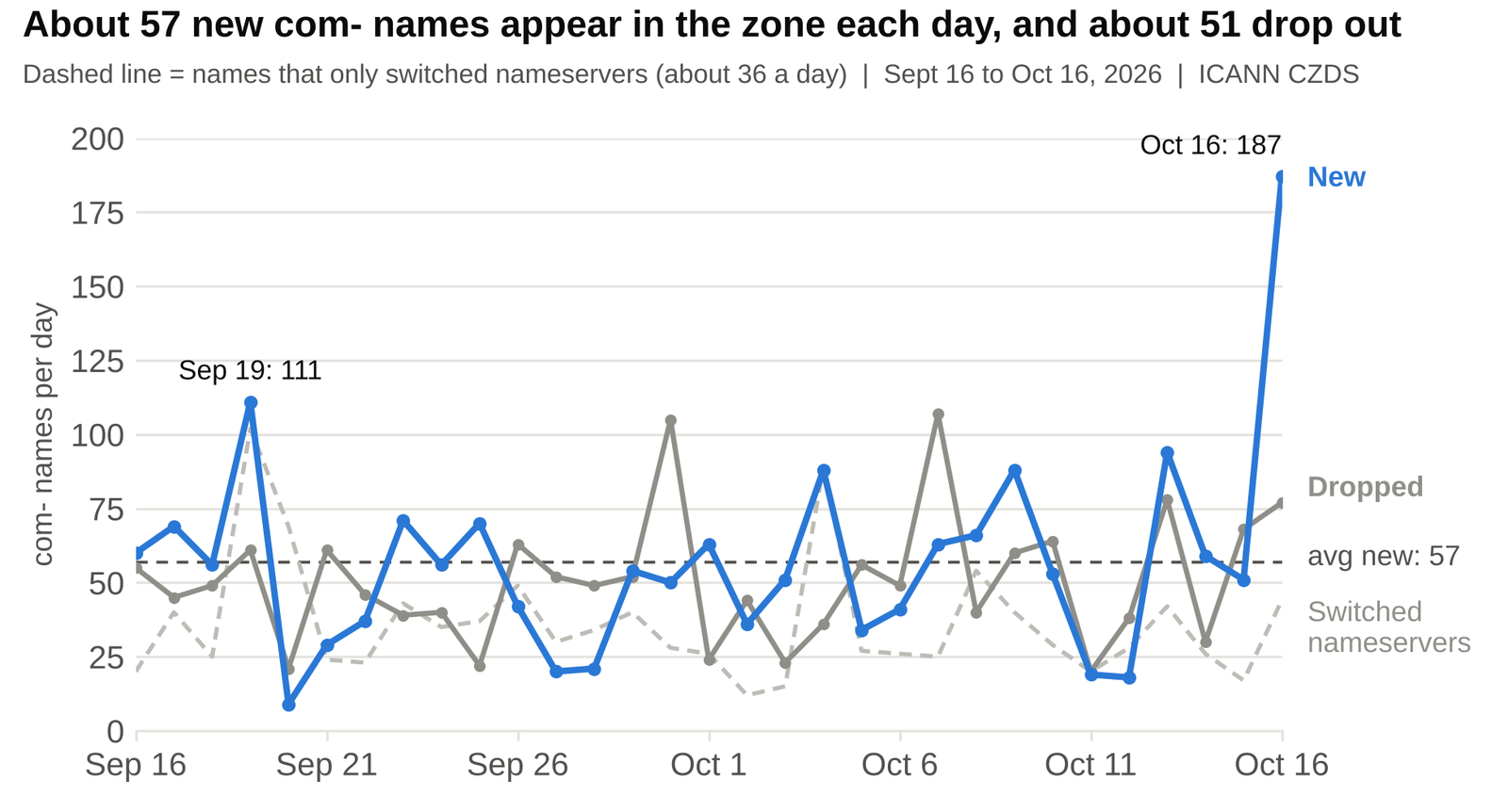
The zone data shows how fast new ones appear. Because the zone logs every nameserver change, a domain that just switches providers shows up as both a removal and an addition on the same day, so I counted those separately.
Between Sept 16 and Oct 16, about 57 new com- names appeared and about 51 dropped out each day, while another 36 a day only switched nameservers (Figure 4). New names showed up every single day, and weekdays averaged slightly more than weekends (about 60 vs. 49).
Figure 4: New, dropped and nameserver-switch com- names in ICANN zone data each day, Sept 16 to Oct 16, 2026.
That steady flow matters because these names do not stay around for long. Figure 5 shows what happened to the 1,759 new names that appeared during the month.
Figure 5: What happened to the 1,759 new com- names that appeared in the zone between Sept 16 and Oct 16, 2026. Nameserver switches are not counted as drops. The second row is part of the first.
What happened to the 1,759 new com- names
| Outcome | Names | Share |
|---|---|---|
| Dropped again before Oct 16 | 306 | 17% |
| Dropped within 3 days of appearing | 212 | 12% |
About 1 in 6 of the new names were dropped again before the month ended, and about 1 in 8 were gone within three days of first appearing, which matches how throwaway scam domains behave. Since names added near the end of the month had less time to disappear, the real share is likely higher. Unit 42 saw the same behavior, with 71% of the campaign's domains lasting less than a week.
A blocklist of specific scam sites tends to stay one step behind this, since a domain can be gone and replaced before anyone reports it. A rule that blocks the pattern catches each new domain the same day it appears.
Comparing the Three Rules
As of Oct 16, 27,577 com- names were registered in the zone, and not all of them are scams. To find the best balance, I tested three versions of the rule:
- Contains com-: blocks any address with com- anywhere in it.
- Rule B: blocks com- only at the start of a section of the address or right after a dash.
- Rule A: blocks com- only at the start of a section.
As Figure 6 shows, the "contains" rule catches every com- scam domain in the feeds, while only 416 of nearly 2 million known good domains would be blocked by mistake, about 1 in 4,700. Moving from Rule B to "contains" catches 2,371 more scam domains and adds only 228 legitimate ones.
Most of those legitimate domains are behind-the-scenes services, like Akamai and Microsoft's content networks or the Intercom chat tool, rather than pages people visit directly. Even Rule A blocks some of them, so an allowlist is needed no matter which rule is used. Figure 7 shows real examples of what each rule blocks and lets through.
Figure 6: How many domains each rule matches: scam domains in the phishing feeds, registered names in the zone, and known good domains (out of 1,955,394).
How many domains each rule matches
| Rule | Scam domains caught | Zone names matched | Known good blocked |
|---|---|---|---|
| Contains com- (recommended) | 13,579 (100%) | 27,577 | 416 (0.02%) |
| Rule B | 11,208 (83%) | 11,820 | 188 (0.01%) |
| Rule A | 8,114 (60%) | 9,906 | 121 (under 0.01%) |
Figure 7: Real examples of what each rule blocks. Scam domains are defanged; the legitimate ones come from the known good list.
What each rule blocks
| Example | Type | Contains com- | Rule B | Rule A |
|---|---|---|---|---|
| usps[.]com-trackujd[.]top | Scam | Blocked | Blocked | Blocked |
| com-trackwqr[.]top | Scam | Blocked | Blocked | Blocked |
| auth-wetransfer-com-4c95d...[.]vercel[.]app | Scam | Blocked | Blocked | Missed |
| remove[.]fbcom-017000922[.]feltna[.]si | Scam | Blocked | Missed | Missed |
| intercom-messenger.com (Intercom chat) | Legitimate | Blocked | Allowed | Allowed |
| telecom-paristech.fr (French engineering school) | Legitimate | Blocked | Allowed | Allowed |
| www-msn-com-world-atm-default.trafficmanager.net (Microsoft MSN) | Legitimate | Blocked | Blocked | Allowed |
| com-c.edgekey.net (Akamai content network) | Legitimate | Blocked | Blocked | Blocked |
Why This Risk Should Not Be Accepted
In GRC (governance, risk and compliance), an organization can accept a risk, reduce it, transfer it or avoid it. Accepting the com- risk means counting on every employee to read every link correctly, every time, often on a small phone screen.
One wrong click can lead to stolen passwords, fraudulent payments, malware, or an attacker taking over a work email account and using it to scam customers and partners.
The tradeoff of blocking is small by comparison. The rule affects about 0.02% of known good domains, mostly infrastructure that can be approved ahead of time, and the main cost is setup time and the occasional exception request.
What to do: That is why I recommend blocking first, then allowlisting: every com- address is blocked by default, and legitimate sites are only allowed through an approved exception.
How to Address This
Device Policy
- Where it goes: The block belongs in tools the company controls, not with its internet provider (ISP). That includes the DNS filter, the firewall (many modern firewalls include DNS and web filtering), the web gateway or proxy, and email link protection. The DNS filter comes first since it covers every device on the company network.
- Check history first: Before turning the block on, search the last 30 to 90 days of DNS or proxy logs for com-. This shows how often employees reach these sites and which legitimate ones would be affected.
- Pre-approve infrastructure: Allowlist services like
edgekey.net,edgesuite.net,akamaihd.netandtrafficmanager.net, plus any business partners found in the logs. - Roll out in steps: Run the rule in log-only mode for five business days, review what it would have blocked, then switch to blocking. If too many legitimate sites are still caught, Rule B is the fallback.
- Manage exceptions: Each allowlist request needs a ticket, a named owner and an expiration date of no more than 90 days.
Sample policy language: "[Company] blocks by default any web address containing 'com-' at DNS filtering, web filtering and email link protection. Exceptions require an allowlist ticket, a named business owner and an expiration of no more than 90 days."
People Policy
A device policy only protects company devices and networks. Many com- scams, like fake USPS and toll texts, land on personal phones where the filter cannot see them.
Warning: This is how a personal compromise can turn into a business one: an employee enters a password on a fake site, and if that password is reused for work, or the phone is also used for work email, the attacker has a way in.
Phishing training should cover:
- Reading web addresses from right to left, and treating com- right after a brand name as a red flag
- Slowing down on urgent messages about packages, tolls, refunds or locked accounts
- Opening the official app or typing the website directly instead of tapping the link
- Using multi-factor authentication and never reusing work passwords
- Reporting suspicious messages, including ones received on personal devices
Limits
- The rule only stops the com- trick. Unit 42 noticed the same campaign registering more gov- domains over time, so the rule should be reviewed regularly, and other tricks like misspelled brand names need other protections.
- The zone data covers 1,079 generic endings like .com, .top and .vip, but no country endings like .io and .co, since ICANN’s program does not include them. com- links built on other people’s websites are not counted either, so the real numbers are likely higher.
- Not every com- domain in the zone is a scam. The zone counts show how many com- names exist and how much a block rule would catch, not how many confirmed attacks there are.
- The 27,577 figure is a snapshot that changes daily.
Overall, the com- trick takes advantage of how people read links and is cheap enough for scammers to repeat thousands of times a month. One block rule, rolled out with an allowlist and backed by training, removes most of that risk at very little cost.
Methodology Note
All data was pulled read-only from CSRF's research database between Oct 16 and Oct 30, 2026. Searches were not case sensitive, and each name was counted once. Zone changes use nameserver (NS) records only, since those control where a domain points. Names added and removed on the same day were counted as nameserver changes, not as new or dropped domains. Full results are available on request. This control maps to CIS Controls v8 safeguards 9.2 (DNS filtering), 9.3 (URL filtering) and 14.2 (Train Workforce Members to Recognize Social Engineering Attacks).
Sources: Unit 42, "The Smishing Deluge: China-Based Campaign Flooding Global Text Messages," Palo Alto Networks, October 2025 (unit42.paloaltonetworks.com/global-smishing-campaign). CIS Controls v8, Control 9 (cas8.docs.cisecurity.org).
About the Cybersecurity Reach Foundation
The Cybersecurity Reach Foundation (CSRF) is a volunteer-run 501(c)(3) nonprofit based in New York City that provides free scam-protection and cyber-safety resources. To learn more, find free resources for your workplace or community, or share this research with your IT team, visit cybersecurityreach.org.